Definitions, acronyms, and terminology used throughout Avionté systems.
Terms across Platforms
| Avionté Core Application | Aero Modules | BOLD | Combined Solution Modules |
|---|---|---|---|
| Front Office | Recruiter Module | BOLD | Connect |
| Back Office | N/A | N/A | Pay / Bill |
| Job Board Portal | Job Board Module | Job Board Portal | |
| Applicant Portal | Talent Module - Application Workflows | Attract | |
| Employee Portal | Talent Module | Attract | |
| Customer Portal | N/A |
| Avionté Core Application Entities | Aero Module Entities | BOLD Entities | Combined Solution Entities |
|---|---|---|---|
| Employee | Talent | Applicants | Talent |
| Customer | Company | Company | Company |
| Contact | Contact | Contact | Contact |
| Order / DH Order | Order | Jobs | Jobs |
| Assignment / Placement | Placement | Start or Hire | Placement |
| Candidate | Candidate | Talent | Candidate |
| Time Entry | N/A | Timesheets | |
| Payroll | N/A | N/A | Payroll |
| Billing | N/A | N/A | Billing |
| Supplier | Division | Employer | |
| Branch | Office | Office | |
| Department | Office | Department |
Definitions
| Word / Phrase | Description |
|---|---|
| # | |
| 1099 | Independent contractor or individual in Avionté whose W2 box is unchecked. They pay their own taxes and insurance but are paid by the primary staffing company. |
| 1094-B | IRS form titled "Transmittal of Health Coverage Information Returns." The 1094-B is the summary form that accompanies the 1095-B, which provides employees' coverage plan information to the IRS. Filers send 1094-B (transmittal) with 1095-B (returns) to the IRS. |
| 1094-C | IRS form titled "Transmittal of Employer-Provided Health Insurance Offer and Coverage Information Returns." The 1094-C is the employer's filing cover sheet sent to the IRS to summarize the 1095-C. Must be filed whenever an employer files one or more Forms 1095-C. |
| 1095-B | IRS form titled "Health Coverage." Used to report information to the IRS and taxpayers about individuals covered by minimum essential coverage, indicating they are not liable for the individual shared responsibility payment. |
| 1095-C | IRS form titled "Employer-Provided Health Insurance Offer and Coverage." Provides information about health insurance and is sent to both employees and the IRS. Applicable Large Employers (50+ FT employees in the previous year) are required to file. Every ALE employee eligible for coverage should receive a 1095-C. |
| A | |
| AB | Alberta |
| ACA | Affordable Care Act. Several background processes run multiple times per day to perform calculations needed by various steps in ACA compliance tracking. |
| ACA Eligible or Full-time | To be ACA Eligible, an employee must average at least 30 service hours per week or 1,560 per year during the Initial or Standard Measurement Period. A new employee expected to be full-time is ACA Eligible from the date of hire, but is subject to re-evaluation. |
| ACA-Eligible hours | Each hour an employee is paid (or entitled to payment) for performing duties, or for being on call. Also includes time off due to vacation, holiday, illness, disability, jury duty, etc. |
| Accounting Period Date | A system static date that is always a Sunday. If the accounting period date is Sunday, May 18th, that accounting period includes assignments for May 10 through May 18th. |
| Accrual Balance Unit | The total number of units accrued by the employee to the current date. |
| Accrual Plan: Accrue Transaction Types | Transaction Types that allow paychecks including supplementary compensation (e.g., Double Time, Overtime) to use separate accrual plans. For example, if Transaction Type DT is selected for Accrual Plan ACC PLAN, every paycheck for DT increases the employee's hours accrued under DT according to the plan definition. |
| Accrual Plan: Depletion Transaction Types | Transaction Types that allow paychecks including supplementary compensation (e.g., Sick Time, Vacation) to use separate accrual plans. For example, if Transaction Type Sick Time is selected for Accrual Plan ACC PLAN, every paycheck for Sick Time decreases the employee's hours accrued according to the plan definition. |
| Accrued Unit | The number of units accrued by the employee per paycheck. |
| Actual Profit | = Burden Rate × Gross Wages |
| Add WH | Additional withholding of taxes from the employee paycheck. |
| Add-in | Extensions added to external applications that allow their data to be imported into Avionté. |
| Adjustment | Does not affect taxes; usually a pass-through that does not affect total sales. Reduces pay. A one-time adjustment entered in Time Entry and applied post-tax (e.g., a charge for a drug test). |
| Adjustment + Deduction | A post-tax adjustment that is taken once or multiple times, depending on whether the deduction is made in Time Entry or the Employee Record. |
| Admin Period | Related to ACA — a period of up to 90 days to enroll full-time employees in insurance. Must last at least 30 days and no more than 90 days. Begins when a new full-time employee is hired, or when an existing employee is determined to be full-time. The employee must be offered a healthcare plan and enrolled before the Admin Period ends. |
| Admin Period (after initial measurement period) | Related to ACA — if an employee is determined to be full-time after an initial measurement period, enrollment must occur by the last day of the first full month following the end of the measurement period. Example: Measurement period ended January 4th — employee must be enrolled by the last day of February. |
| ADP | Used to align the Avionté application to a client's online Work Opportunity Tax Credit configuration. |
| Advance Warning Timeframe | A Config Option in Avionté — a set number of days prior to an ACA Eligible employee's last day of the Admin Period. When this timeframe is reached, the employee appears on the Enrollment Deadline (ACA) counter. Calculation: Measurement Period + Admin Period – Advance Warning Timeframe = when employee is added to the counter. Setting both the Admin Period and Advance Warning Timeframe to the same number of days will add an employee to the counter immediately upon eligibility. |
| AdvanceBank | Used for tracking overpayments to employees. A deduction is then added to reimburse the overpayment. This is the default option and does not require additional setup. |
| Agency | In Avionté, an entity that assists your staffing company. |
| Agency Cost | Total amount payable to a sub-contracting agency or individual contractor, not including pass-through deductions. Note: Gross wage is for W2 transactions; Agency Cost is for non-W2 transactions. |
| Agent Manager Application | The software that manages environments and packages in the Avionté Agent. |
| Agent Software Application | The software installed for each instance. |
| ALF | Avionté Link Forwarder |
| All-Or-Nothing | An All-Or-Nothing deduction can cause an entire sequence of deductions to not be processed if any deduction in the sequence cannot be withheld from the paycheck. |
| Allow Edit ACA Eligibility | A Config Option in Avionté. If set to True, the dropdown becomes available in the ACA Eligibility screen and eligibility is recorded at the individual employee level. Note: The Config Form for ACA Eligibility must also be set to IsVisible for the user. |
| Allow Multiple Entry | Allows multiple transaction types within the same transaction (e.g., a one-off equipment return transaction can occur multiple times per transaction). |
| Allow Web Time Entry | Allows users to add time from the web portal for this transaction type. The transaction type appears in the Type drop-down when adding items from the web portal. |
| Allowable Disposable Income | Disposable income × CCPA % limit |
| Amazon Web Services (AWS) | A suite of cloud-computing services providing on-demand computing. Operates from 13 geographical regions worldwide, providing backup redundancy at a per-use rate. |
| AMP | Avionté Metadata Platform — http://amp.avionte.local/ |
| Announcement | Used to place announcements on the Avionté Start page. |
| AOM | Avionté Order Management |
| API | Application Program Interface — a set of routines, protocols, and tools for building software applications. Specifies how software components should interact. Allows external applications to communicate and transfer information with the core application. |
| APP | Avionté Payroll Processor |
| Applicant | A person who has not previously applied or been screened at the staffing company. Their information has not yet been compiled into an employee record. |
| Applicant Tracking System (ATS) | Software such as Avionté that allows users to manage and administer changes to applicants and other entities. |
| Appointment | Another tracking method for a user to associate a due date to their message. |
| ARM | Avionté Relationship Management |
| ARP | Avionté Resume Processor — https://arp.avionte.com |
| Assign Email Templates | An Admin Tool that allows standard or customized email templates to be assigned for use with emails sent on candidate assignment and web portal credential changes. |
| Assignment | Occurs when an employee is assigned to an order within Avionté by a user. The employee then begins working for the customer. |
| ATE | Avionté Time Entry |
| ATM | Avionté Talent Management |
| ATS | Applicant Tracking System |
| Aux | Auxiliary device, usually a serial port. Windows reserved file name. See Microsoft KB74496. |
| Avi | Short for Avionté; reserved for internal use environments. |
| Avionté Agent | An automated, continuously-running Microsoft Windows service used to schedule background tasks (e.g., "CareerBuilderProcessor," which updates Career Builder job post statuses once per day). These scheduled jobs ensure the data displayed in Avionté is current and accurate. |
| Avionté Resume Processor (ARP) | An Avionté component used to parse resume documents into an Employee, Candidate, or Talent record. |
| AVM | Avionté Vendor Management |
| AWS | Amazon Web Services |
| B | |
| Back Office | Financial operations and transactions for a company: time entry, payroll, billing, accounts receivable, and accounting period information. In Avionté, Back Office consists of Time Entry, Payroll, Billing, Invoice, AR, AP Paycheck, Weekly Process, and Import/Export. |
| Background Check Plugins | Some integration partners that provide background check services require a plug-in to communicate with Avionté. The Admin Tools Background Check Plugins option enables the configuration of the Avionté application with a client's background check provider. |
| Background Check Provider | The Admin Tools Background Check Provider is used to manage — add, disable, and delete — background check providers. |
| Batch | A grouping of selected transactions that allows a user to process them through the back office (payroll, billing, time entry) as desired. |
| BC | British Columbia |
| Bill Amount | Total bill before any taxes are deducted. |
| Bonus | A transaction type where supplementary earnings are given to an employee in addition to usual compensation. Can be entered at the order level or during time entry. Pay unit equal to 1 is typically entered for a bonus transaction type. |
| Branch | The branch of the order. |
| Break of Employment | If an employee has not received a paycheck for 91 days, or for longer than their previous continuous employment period (minimum 28 days), they undergo a break in service and are treated as a new hire on their next assignment. ACA status is automatically set to Undetermined and existing ACA measurement data is deactivated. |
| Break-In-Service | See Break of Employment. Same criteria apply — 91 days without a paycheck, or longer than the previous continuous employment period (minimum 28 days). |
| Bronze Plan | The lowest regular plan offered under the Affordable Care Act. Generally covers 60% of claim costs. |
| Burden | The actual total cost of employing an individual — beyond salary, this includes health insurance, pension costs, and payroll taxes. The Admin Tools Burden functionality is used to view, edit, and add burdens to the system. |
| Burden (general liabilities) | The cost of doing business. Set up in Admin Tools > Burden. See the Additional Descriptions section for a full example with calculations. |
| Burden Factor | The Admin Tools Burden Factor functionality is used to view, edit, and add burdens to a specific transaction type in the system. |
| Burden Tax Amount | The extra cost associated with paying taxes to the government. |
| C | |
| Caf125 | Cafeteria plans that allow employees to set aside pre-tax income for certain employer-offered benefits (adoption, 401k, etc.). Named for their menu-style selection of benefits. |
| Candidate | A job seeker who has submitted information to a staffing company for a suitable job. In Avionté, a candidate is a person who is qualified for a position. |
| Card | In the Aero Recruiter Module, records within each section are displayed in a card format. |
| Card View | Displays detailed information for one employee's transaction. Accessed by double-clicking an employee's row in Sheet View or clicking Show Card View. Time can be entered in daily or weekly view. |
| Certification Type | The Certification Type section in Admin Tools allows users to configure the certifications that appear in the Employee and Customer sections. |
| COBRA | Consolidated Omnibus Budget Reconciliation Act of 1985. Enables a person or their dependents to maintain employer health insurance without interruption after leaving employment. Typically requires the individual to pay all monthly premiums; coverage is generally available for up to 18 months after leaving employment. |
| Company | The organization where a candidate will work. In the Aero Recruiter Module, the Company section holds all prospect and customer data — equivalent to Customer in Avionté. |
| Company (AU) | Businesses entered into Avionté through manual entry or via the Echo browser / Outlook Add-in. Companies place job orders with the staffing company to fill required positions. |
| Config Bank | The Config Bank option in Admin Tools allows users to add, edit, or delete the list of banks in the Avionté system. |
| Config Choice | Used to choose what is included in drop-down menus throughout the Avionté Core application. |
| Config Edit Mask Type | Masks determine how data is displayed in the application (e.g., ###-###-#### for a telephone number). Admin Tools Config Edit Mask Type allows users to add or edit mask types. |
| Config Option | A customizable value that can be set for different entities, or the entire system, to affect the behavior or features of the product. Contains all settings for allowing or disabling various functions within Avionté. |
| Contact | A person related to a particular customer or potential customer. Contacts can also be entered for agencies or deduction authorities. Entered from either the customer's sub-tree option or the Contact main-tree option. |
| Contact (AU) | Person(s) related to an existing or potential customer company, agency, or deduction authority. Entered manually or imported via the Echo browser or Outlook Add-In. |
| Contact Method | Different methods by which an entity (employee, customer, contact) can be contacted. Examples: home phone, main phone, cell phone, email, pager, website, fax. |
| Core Application / Core App | The main Avionté application with the Main Menu on the left. Also referred to as the "Suite application." Called "core application" since the introduction of web portals and the Aero platform. Though they interface with the same data, the core app differs from web portals and Aero in functionality, behavior, and style. |
| Cost Worker Comp Cost | WC Wages × Rate Percent = Worker Comp Cost; WC Wages × Cost Percent = Cost Worker Comp Cost. Rate % changes per customer; Cost % is a base rate not likely to change. |
| Counter | Counters on the Start Page provide a quick view of the current number of emails, appointments, open orders, tasks, arrival calls, weekly calls, etc. |
| Create Transaction | Pulls all transactions from open Assignments ready to be paid or billed for an open Accounting period. |
| Credit Card Fee | Processing charge whose rate is defined in ConfigSystemChoice under category 'CreditCardType,' property = "FeePercent." CC Fee = total bill × fee rate. Credit Card can be selected from the Order. |
| Customer / Client | Companies entered into Avionté through manual or electronic entry. They place orders for service from the staffing company to fulfill a required job position. |
| D | |
| Data Requirement Message (DRM) | An on-screen message used to request more information from a user or inform a user that an action may cause unwanted results. |
| Days Sales Outstanding (DSO) | The number of days since a bill has been charged to a customer. Calculated using the current date; not affected by the due date. |
| Deduction + Contribution | A transaction that is both an employee permanent deduction and an employer contribution (e.g., an employer-matched 401K plan). |
| Deduction Amount | Amount to be deducted from the employee's paycheck. |
| Deduction Amount LTD | Total deduction amount paid by the employee from the beginning until the current date. |
| Deduction Amount YTD | Total deduction amount paid by the employee from the beginning of the current year until the current date. |
| Deduction Authority | Organizations such as child support agencies or health insurance agencies to which deductions are submitted. |
| Deduction DI Percent | Maximum percentage by which the deduction amount can reduce from the Disposable Income (DI). |
| Deduction Max Percent | A set limit — a deduction cannot supersede this percent of an employee's paycheck. |
| Deduction Rate | Sets the specific dollar amount or percentage that determines the amount deducted for a given tier. |
| Deductions | Items removed from an employee's gross income: taxes, garnishments, retirement plans, medical pay, etc. Found in Employee – Payroll – Deduction Setup. |
| Determination | Each employee is evaluated to determine their full-time or variable-hour status and ACA Eligibility. For new variable-hour employees, determination follows the Initial Measurement Period. For all others, it follows the Standard Measurement Period. After determination, employees continue the standard measurement and determination rotation. |
| Determining Which ACA Safe Harbor Calculation to Use | Companies may use the same safe harbor for all employees, or different safe harbors for different reasonable categories (e.g., salaried vs. hourly). The three options are: FPL (Federal Poverty Line) — simplest; Rate of Pay — next easiest; W-2 — least desirable as it requires end-of-year W-2 data. Safe harbor use is optional; use it when administrative simplicity outweighs the complexity of determining eligibility. Affordability safe harbor codes on 1095-C are "last resort" codes used only when no other Line 16 code applies. |
| DI Exempt | A deduction (usually voluntary) that can be taken from an employee's take-home pay even if the deduction causes the disposable income (DI) to fall below the set limit. |
| Discount Type | Used to enable entry of new discount types for use on the Discount tab on the Order Options item of the Customer section in Avionté. |
| Disposable Income | Gross pay – mandatory deductions. |
| DSO | Days Sales Outstanding |
| Dynamic Panel | The Dynamic Panel section in Admin Tools is used to configure the horizontal and vertical panels available in different sections of Avionté. |
| E | |
| Effective Insurance Date | The date an employee must first be offered healthcare when they are determined to be ACA eligible. The start of the employee's first Stability Period. |
| Electronic Signature Device | The device used to electronically sign eDocuments on the employee web portal. |
| Employee | People who have applied through the staffing company, been screened, and approved for hire for available jobs. |
| Employee Benefit Plans | Admin Tools section used to set up a correlation between an employer contribution to an employee benefit and an associated employee payroll deduction (e.g., employer-matched 401K, or a health plan with employer and employee portions). |
| Employer | The name of the staffing company filling the position. |
| Employer Taxes | Sum of tax amount to be paid by the employer for the transactions included in the paycheck. |
| Enrollment Period | Under the Affordable Care Act, people must enroll in health insurance during a set period each year. Failure to enroll by the close of enrollment results in non-compliance with the ACA. |
| Environment | An Avionté Suite database. Most customers have one production environment; some have additional environments for testing upgrades (parallel) or training. |
| ER Contribution | An employer-only contribution for a type of benefit (e.g., employer-paid long-term disability coverage). |
| ESS | Enterprise Search Service |
| Essential Health Benefits | The ACA requires all insurance policies to cover 10 essential health benefits: (1) Ambulatory Patient Services, (2) Emergency Services, (3) Inpatient Hospitalization, (4) Maternity and Newborn Care, (5) Mental Health and Substance Abuse Services, (6) Prescription Drug Coverage, (7) Rehabilitative and Habilitative Services, (8) Laboratory Services, (9) Preventative and Wellness Services and Chronic Disease Management, (10) Pediatric Oral and Dental Care. |
| Evaluation | A feature in Admin Tools used to create and send customized surveys to employees and contacts. |
| E-Verify | An Employment Eligibility Service managed by the US Department of Homeland Security. Avionté integrates with E-Verify and displays the E-Verify screens used to gather information sent to DHS. |
| Exemption | Designated groups exempt from the ACA individual mandate include: Native Americans and Alaskan tribes, members of recognized healthcare sharing ministries, members of religious sects opposing health insurance, incarcerated individuals, those in the US unlawfully, those without healthcare for 3 months or less, those under 26 on a parent's plan, those exempt from filing federal income tax, those whose lowest bronze plan exceeds 8% of household income, and those qualifying for a hardship exemption. |
| Exemption Certificate Number (ECN) | If approved for an exemption by the federal government, an ECN is assigned and must be cited on federal income taxes to indicate ACA compliance exemption. |
| Exemptions | Not used when configuring tiered deductions — should be left blank. |
| F | |
| Federal Marketplace | The ACA-required federal website where Americans in states relying on the federal government to administer the law can shop for health insurance. Found at Healthcare.gov. |
| Federal Poverty Line Safe Harbor | The simplest ACA affordability calculation. Calculate 9.66% of the one-person household federal poverty figure for the year and divide by 12 to get the monthly employee premium threshold. If the employer offers a plan below that threshold, ACA affordability criteria are met. |
| FG | A processing method for Worker's Compensation. Calculates WC from the sum of Gross wages × WC rate. |
| FieldName: (parentheses) | The field name followed by values and an operator in parentheses avoids repeating the field name. Example: lastName: (Peterson OR Smith) instead of lastName: Peterson OR lastName: Smith. |
| Form | The Admin Tool Form option allows users with Admin Tool privileges to grant or restrict access to certain menu and sub-menu items for specific users. |
| Front Office | Day-to-day operations of a staffing company: Customer Service, Customer Support, operational CRM, and Sales. In Avionté, the Front Office consists of Employee, Customer, Order, DH Order, Assignment, Contact, and Agency. |
| FTE | Full-time employee |
| Full-time | An employee averaging 30+ service hours per week during the Initial or Standard Measurement Period. |
| Full-Time Employee | An employee who works, or is expected to work, an average of at least 130 hours per month (30 hours per week). |
| Full-Time Equivalent | Sum of all non-full-time employee hours ÷ 120 hours ÷ months in the look-back period. Example: 1,000 part-time employees working a combined 520,000 hours over a 12-month standard look-back: [520,000 / 120] / 12 = 361 full-time equivalent employees. |
| G | |
| Garnishments | Deductions (typically government-issued: court-ordered fines, child support, etc.) taken from an employee's paycheck after taxes but calculated with other deductions to ensure required payments can be made. |
| Geocode | A numerical coordinate representing a location on Earth's surface. Avionté and Vertex use geocodes to identify locations and determine correct tax withholdings for employees and employers. A precise address must be entered to enable accurate geocoding. |
| Gold Plan | ACA insurance plan covering 80% of healthcare costs; the insured covers the remaining 20%. Typically offers higher monthly premiums but lower copays, coinsurance, and deductibles. |
| GP Adjustment Bill | Items the staffing supplier includes in the GP Calculation even if the item type has isDeduction=1, by setting the transaction Type property GP Calculation=True. |
| GP Adjustment Cost | Items included in the GP Calculation even if the item type has isDeduction=1, by setting transaction Type property GP Calculation=True. |
| GP Adjustment Pay | Items included in the GP Calculation even if the item type has isDeduction=1, by setting transaction Type property GP Calculation=True. |
| Grace Period | Under the ACA, insurance companies cannot cancel a policy until more than 90 days of premium delinquency. This 90-day grace period allows policyholders to make pending premium payments before cancellation. |
| Greenshades | An advanced tax service used by some clients. A job package is required to use this service. |
| Gross Amount | Sum of all Gross wages in a Transaction. |
| Gross Income | Total income/earnings before deductions. In Avionté, gross pay equals Item Pay in time entry. |
| Gross Pay | The beginning value of an employee's paycheck, before any money is withheld. |
| Gross Profit (GP) | Profit made by a staffing company on a transaction. GP = Bill Amt. – (Gross Wages + WC Cost + Employer Taxes + Burden). See the Additional Descriptions section for the full formula breakdown. |
| Gross Wages | Taxable income — does not include pass-through deductions. |
| GTM | Go To Market approach |
| H | |
| HCM | Human Capital Management |
| Healthcare Plan Offered | A Config Option in Avionté. If set to True, a healthcare plan is offered by the employer. If set to False, Avionté calculates penalty taxes owed by the employer (if applicable based on company size). |
| HIPAA | Health Insurance Portability and Accountability Act of 1996. Intended to make it easier to keep health insurance, protect the confidentiality and security of healthcare information, and help the healthcare industry control administrative costs. |
| HireGuide | Found in the Employee Background Check results grid. Tracks the status of a background check document. Values: empty (initial), Proceed (passed), Review (more information needed), Stop (failed). |
| Home Office (Talent) | The office identified as the closest office to a talent's home address — either selected by the talent when applying, or assigned by the person entering them into the system. |
| Hourly | A processing method for Worker's Compensation. Calculates WC based on hours worked. |
| I | |
| Identity | The application's method of identifying a user. When a user logs into Aero with a username and password, they are recognized as having specific roles, access, etc. |
| Import Export Mapping | Matches incoming data terms to existing Avionté data definitions. For example, if an integration partner uses "Reg," "OT," and "DT" but Avionté uses "Standard," "Overtime," and "Double Time," Import Export Mapping translates the terms during import. |
| In Progress | Displays the number of postings that have been started and saved in whole or in part, but not yet published to any job board. |
| Include in ACA Hours | Hours of paid leave (FMLA, Military, Workers Compensation) count toward hours of service when determining ACA Eligibility. The IncludeInACAHours property must be set to True for these transaction types. |
| Individual Mandate | The ACA requirement that all individuals obtain qualifying health insurance by the end of the open enrollment period each year, or pay a tax penalty. In June 2012, the Supreme Court determined the mandate was constitutional under the federal government's right to tax. |
| Initial Measurement Period | Related to ACA — the period used to determine ACA Eligibility for a new variable-hour employee. Must be 3 to 12 months. If determined eligible, the employee must be offered a plan and enrolled within 30 days of the period end date. The employee then begins the standard measurement and determination rotation. |
| Integration | Third-party programs whose functionality has been added into an Avionté product. |
| Integration ASP.NET Web Service | A standardized mechanism using XML, SOAP, WSDL, and UDDI open standards over an Internet backbone, enabling Avionté to interact with integration partners. |
| Is Adjustment | A one-time adjustment made in Time Entry and applied post-tax (e.g., a drug test charge). |
| Is Discretionary Bonus | Indicates if the transaction type is a discretionary bonus (isDiscretionaryBonus) and whether it should be included in overtime rate calculations. |
| Is Equipment | Adds the transaction type to Mass Equipment Deduction tracking. |
| Is ER Contribution | Adds this transaction type to the drop-down menu in the Employee Contribution sub-tree. |
| Is Healthcare | Indicates this transaction is related to healthcare. If the Config Option HealthcarePlanOffered is set to False, transactions with this setting will not be usable. |
| Is Permanent | Adds this transaction type to the Employee Deduction screen. |
| Is Tiered | Sets this transaction type as a tiered transaction. See Transaction Type - Tiered Transactions. |
| Is Transactional | Adds the transaction type to the Time Card Entry screen as a right-click option and as a transaction type at the Order/Assignment level. |
| IsFixAmount | When checked, indicates a specific dollar amount will be deducted for this tier. |
| IsLevy | When checked, indicates the entire amount between the Lower Limit and Upper Limit will be deducted for this tier. |
| IsPercent | When checked, indicates a percentage of income will be deducted for this tier. |
| J | |
| Job Board Module | Offers the ability to configure multiple job boards and post all jobs (temporary and direct hire) from the Recruiter Module. Will replace the functionality of the Job Board portal. |
| Job Portal | Admin Tools function used to manage job boards populated with Avionté data (e.g., Indeed, Simply Hired, Career Builder). |
| K | |
| Keywords with operators | Boolean operators (AND, OR, NOT) help refine search results. Use AND to narrow: "Microsoft AND java" returns only results containing both. Use OR to broaden: "Microsoft OR java" returns results containing either. Boolean operators are not case-sensitive. |
| L | |
| Large Employer | Related to ACA — an employer with 50 or more full-time and full-time equivalent employees. |
| Large Group Health Plan | A group health plan covering employees of an employer with 101 or more employees (51+ in some states through 2016). |
| Levy | A legal garnishment that removes "all but" a specific value or percent from a paycheck (e.g., child support, court orders). A levy is a DI exempt deduction. |
| Limited Cost Sharing Plan | Available to members of federally recognized tribes and ANCSA Corporation shareholders regardless of income or premium tax credit eligibility. Enrollees pay no copayments, deductibles, or coinsurance when using Indian health care providers. |
| Live | The number of posts currently published to a job board. |
| Look Back Period | Related to ACA — a period of 3, 6, 9, or 12 months used to measure whether an employer is considered large. |
| Lower Limit | Sets the point at which the deduction for a given tier will start. |
| M | |
| MarkUp | An increase to an original value. The MarkUp functionality in Admin Tools manages markups on elements such as pay rates — create, edit, and assign to branches. |
| Master Order | A status used for copying purposes only — not counted toward job metrics. Used for repetitive or common orders. |
| MathOperators | Math operators can replace Boolean AND, OR, NOT. Example: accountant +Microsoft –apple matches records with "Microsoft" but not "apple," and adds relevancy for accountants. Operators: +, –, =, <, >, <=, >= |
| Max Percent of Net | A set limit below which an employee's paycheck cannot be reduced (DI Exempt deductions are excluded from this policy). |
| MB | Manitoba |
| Measured Eligibility | Determined by service hours worked during a measurement period. Averaging 30+ hours per week = Full-time eligibility. Averaging 29 or fewer = Non-full-time. |
| MEC | Minimum Essential Coverage — healthcare coverage that fulfills all requirements for an individual to comply with the individual mandate. Visit the IRS web page for current guidelines. |
| Message | In Avionté, where all communication with customers, employees, contacts, etc., is tracked and monitored. Users can incorporate appointments/tasks and attach additional entities when creating a message. |
| Multiple terms / sub-queries | Multiple terms or clauses can be grouped with parentheses: ((quick OR brown) AND fox). Items in parentheses are addressed first, left to right when multiple sets are present. Operator precedence: NOT > AND > OR. |
| MVP – Minimum Value Plan | A comprehensive health insurance plan with at least 60% actuarial value (pays at least 60% of claims on average). ACA plan levels by actuarial value: Bronze = 60%, Silver = 70%, Gold = 80%, Platinum = 90%. |
| N | |
| NB | New Brunswick |
| Net Amount | Total Gross Amount less applicable adjustments or discounts. Net Amount = (Gross Amount + Adjustment Pay Amount) – Total Deductions – Total Taxes. |
| Net Income | Remaining earnings after all deductions. In Avionté, net income is the amount received on an employee's paycheck. |
| Net Pay | The amount an employee receives on their paycheck after all taxes, garnishments, deductions, etc. |
| NL | Newfoundland and Labrador |
| Non-DI Exempt | A deduction that will not be taken if it would cause the disposable income (DI) to fall below the set limit (typically minimum wage; default is Max Percent Of Net). |
| Non-Payroll Cost | Sum of Credit Card Fee and Rebate Amount. |
| Non-transaction type value | A value that is not a defined transaction type. |
| Notice of Health Exchange | Also referred to as Notice of Exchange (NOE). |
| NS | Nova Scotia |
| NUL | Bit-Bucket Device. Windows Reserved File Name. See Microsoft KB74496. |
| O | |
| Off-Exchange | Insurance policies offered directly from insurance providers (through their website, a third-party site, or a licensed agent/broker), rather than through the state or federal Marketplace. The opposite of On-Exchange. |
| ON | Ontario |
| Onboarding | A portal used to import new employee data into the Avionté system. |
| On-Exchange | Health insurance policies offered through the state or federal Marketplace. The opposite of Off-Exchange. |
| Open Enrollment Period | The set period each year during which a person can enroll in or change health insurance. Failure to have health insurance by the close of enrollment may result in a tax penalty under the ACA. |
| Order | A request from a customer for a particular job position, which may include the number of positions, dates, rates, etc. |
| OT Plan | Some states have their own overtime plans. California: anything over 8 hours per day is OT. Federal: anything over 40 hours per week is OT. OT Plan can be set at the customer level and transfers to the order and then to the transaction. Once selected, OT hours are calculated automatically. |
| Other Bill | Total amount billed for transaction types with property 'IncludeInOtherHours=True.' |
| Other Pay | Total amount paid for transaction types with property 'IncludeInOtherHours=True.' |
| Outlook Add-In | A feature that enables a user's Microsoft Outlook email application to interact with Avionté data. |
| P | |
| Package | Groups of software a service instance can execute. Each group contains one or more Agent Jobs that run unattended on a schedule (once per day, once per hour, etc.). Typically focused on a particular piece of Avionté functionality. |
| Part-time Employee | Generally, a person working 29 or fewer hours per week. Under the ACA, employers are not required to provide health insurance to part-time employees. |
| Pay Other Hours | Items with the property IncludeInOtherHours=True. |
| Pay Percent of Transaction | The percentage of the total paycheck amount occupied by each individual transaction. See the Additional Descriptions section for a worked example. |
| PayCode | Applies to transactions for regular, overtime, and double-time pay. |
| Payment Cost | Sum of Gross Wages, Agency Cost, WC Cost, Employer taxes, and Burden. |
| Payroll Cost | Sum of Gross Wages + Employer Tax. Also expressed as: Gross Wages + Employer Taxes + Burden + Worker Comp Cost + Agency Cost. |
| PE | Prince Edward Island |
| Penalty (ACA) | Amount a large employer pays beyond the 30th full-time employee if they have 50+ combined full-time and full-time equivalent employees. Example: 33 full-time employees choosing not to offer insurance would owe a penalty on 3 employees (33 – 30 = 3). |
| Penalty Annual Amount | An annual dollar amount paid as a penalty tax to the US government per qualifying full-time or full-time equivalent employee not covered by a healthcare plan. The field is editable as amounts change over time. |
| PEO | Professional Employer Organization — a firm providing services under which an employer can outsource employee management tasks (benefits, payroll, workers' compensation, recruiting, risk/safety management, training). The Admin Tools PEO functionality enables addition and management of PEOs in Avionté. |
| Peoplenet Time Clocks | Online timeclocks used by employees to track work time while sending data directly into Avionté. Admin Tools > System Peoplenet Time Clocks manages which suppliers have access to the Peoplenet integration. |
| Per Hour Deduction | A deduction taken based on hours worked for a pay period. |
| Permanent Deduction | An employee's pay deduction entered in the Employee Record only. |
| Placement Office | In Hired Details on a job: the office that placed the individual on that job. |
| Platform | In the context of the "Aero Platform," the environment in which Avionté software is executed. The Aero platform is built on data previously only available in the Avionté Suite application; both currently share the same data. Avionté is moving toward using only the Aero platform. |
| Platinum Plan | The highest ACA coverage level, covering 90% of healthcare costs. Lower deductibles, copays, and coinsurance, but typically higher monthly premiums. |
| PO Number | Project-specific number (common for government projects). In Avionté, tracked in the order extra and displayed on the invoice. Includes total budget allocation and can trigger a warning notification when a set value or date is reached. |
| Portals | External access windows designed per user role (Applicant, Admin, etc.) that access and interact with data in the Core application. |
| Posting ID | The order ID with -1, -2 appended to indicate which post is selected. Blank if the order has no postings or is new and unsaved. |
| Post-Tax Deduction | Items deducted from Total Gross after taxes have been applied: child support, garnishments, levies. |
| Pre-existing Condition | A health condition existing before the start of a health insurance policy. Under the ACA, insurers cannot deny coverage or claims based on pre-existing conditions. |
| Prefecture | For key countries that use prefectures (Japan, Italy, etc.), available prefectures are shown under the "State" dropdown. Not required; used for reference only. |
| Pre-Tax Deduction | Items deducted from Total Gross Pay before applicable taxes are applied: retirement plans, Caf125. |
| PRN | System list device, usually a parallel port. Windows reserved file name. |
| Q | |
| QC | Quebec |
| Qualifying Life Event | An event that triggers a Special Enrollment Period, allowing enrollment outside open enrollment without penalty. Examples: moving to a new state, marriage or divorce, birth or adoption, income change affecting financial assistance eligibility, losing existing health insurance. |
| Quarterly Summary | Summary displaying the total for the quarter (e.g., 941). |
| QuickLink | Buttons on the left-hand side of a card offering quick connections to frequently needed information: contact data, profile information, and the individual's resume. |
| QuickView | Buttons on the right-hand side of a card offering a detailed view of information for Talent, Contact, Company, or Order records. |
| R | |
| Rate of Pay Safe Harbor | Calculates ACA affordability based on employee compensation. Multiply monthly salary by 9.66% to get the maximum monthly employee premium for qualifying coverage. For hourly employees: use the lower of (hourly rate on the first day of the plan year × 130) × 9.66%, or (lowest hourly pay rate during the calendar month × 130) × 9.66%. |
| RDL | Report Definition Language — the language and shorthand used to create reports within Avionté. Contains Page Style, Field Definitions, Parameters, and database connections for a specific report. |
| Rebate Amount | Part of non-payroll cost not included in the invoice amount; calculated based on the Discount Type setup. |
| Recruiter Module | The Aero module supporting direct hire orders. Holds all front office data for direct hire recruiting activities. |
| Rehabilitative Services | One of the ten ACA essential health benefits. Services helping a person reacquire skills or activities lost due to illness or disease (e.g., occupational therapy, physical therapy, speech therapy after a stroke). |
| Related User | The name of the person updating the profile. |
| Removed | The posting has been removed from all job boards. |
| Report | The Admin System Server Report option is used to make standard reports and AQs available to Avionté users or groups. Also manages report category names, descriptions, and config choice mapping. |
| Resume Term Mapper | An Admin Tools function used to anticipate synonyms from incoming resumes, helping Avionté's resume parsing service properly recognize terms and keywords and match them to corresponding skill codes. |
| RG | A processing method for Worker's Compensation. Calculates WC from the sum of transaction types in gross wages, with OT divided by 0.5 and DT divided by 2. |
| ROE_Account_Number | Similar to the US FEIN, the Record of Employment account number is a 15-character number for each Federal ID in Canada. Used in situations such as Canada's unemployment insurance tracking. |
| Rules | Refers to the Rules engine (similar to AviontéCLASSIC DRMs). |
| S | |
| Safe Harbor | A term describing when an employer has offered insurance at an acceptable rate, avoiding federal fines. Employers affected by the employer mandate have three affordability calculation options (safe harbors) to determine ACA affordability. The same safe harbor must be applied uniformly within a "reasonable category" of employees. |
| Sales Tax | The Sales Tax option in Admin Tools > System is used to set up state sales tax for services provided by a staffing company. |
| Sales Tax Amount | Calculated per transaction item using configSalestax, configSalestaxRate, and configsalestransactionType tables. Must be selected in the worksite address to calculate. Sales tax amount = Item Bill × Sales Tax Rate. |
| Search Type | The Search Type section in Admin Tools enables addition of new search types and making existing search types visible. |
| Section | The distinct regions of Aero navigated by the tabs at the top of the Recruiter Module (Talent, Order, Company, Contact). Functions similarly to the Main Menu in the Avionté Suite application. |
| Sequence | A deduction sequence is a group of deductions calculated and deducted simultaneously. Most paychecks have multiple sequences; there are restrictions on which deductions can share a sequence. |
| Service Hours | Hours counted when determining ACA Eligibility. Includes actual hours worked plus FMLA, Military, and Workers Compensation hours. |
| Service Instance | A Windows service installed as a copy of the Agent Software Application. Independently managed from other Service Instances on the same server. |
| Shared Responsibility Payment | The formal name for the IRS tax penalty assessed to any person required to obtain health insurance under the ACA who failed to do so by the end of open enrollment. |
| Sheet View | Displays all transactions ready for time entry. Unit amounts can be entered in the Pay Unit and Bill Unit cells. (By default Pay Units = Bill Units.) |
| Shift | The Shift section in Admin Tools manages work shifts, including adding new shifts. |
| Show Employer Contribution on Paycheck | Causes this transaction to appear on the employee's paycheck as an employer contribution. |
| Silver Plan | A medium-level ACA insurance plan covering approximately 70% of healthcare costs. Typically offers lower monthly premiums but slightly higher copays, coinsurance, and annual deductibles than higher-tier plans. |
| Similar Phrase Match | Using a tilde (~) with a phrase weights the words by proximity rather than requiring an exact match. Example: "Microsoft excel"~ matches records containing both "Microsoft" and "excel" and weights records with the complete phrase highest. |
| Similar Word Match | Using a tilde (~) after a single word performs a fuzzy match. May return results with close but incorrect spelling. Example: manager~ may also return "manger." |
| SK | Saskatchewan |
| Skill Code | Admin Tool allowing users to add, edit, and delete skill codes and categories that appear in Order Options, Web Portals, and Skills. Also used to link certifications to skill codes. |
| SMTP | Simple Mail Transfer Protocol |
| Special Enrollment Period | If a person loses health insurance due to a Qualifying Life Event after the open enrollment period closes, they can sign up on the federal marketplace within 60 days of the event. |
| Split Plan | The Split Plan section in Admin Tools allows creation of revenue sharing plans for use when processing transactions. |
| Stability Period | Related to ACA — the period following the administration period. ACA coverage cannot be removed during this time, regardless of hours worked. At the end, the employee's eligibility status is re-evaluated. |
| Staffing Supplier | Another staffing agency hired to support your staffing agency. Typically used to help fulfill an order that is larger or more complex than usual. |
| Stage Status | Displays where a stage is within its workflow. Values: Approved (recruiter approved), In Progress (started but not submitted), Initiated (not started), Rejected (recruiter rejected), Submitted (submitted, not yet processed). |
| Standard Measurement and Determination Rotation | The Standard Measurement Period followed by re-evaluation of ACA Eligibility status. This rotation continues as long as the employee is employed. |
| Standard Measurement Period | Must be 3 to 12 months. A global measurement beginning on the date set in StandardMeasurementStartDate, lasting the amount of time in StandardMeasurementPeriod. If HealthcarePlanOffered is True, Avionté automatically calculates this period and determines ACA Eligibility for all existing employees. All employees continue repeating this rotation as long as they are employed. |
| Standard Measurement Start Date | The month and date when the standard measurement period begins — normally 1/1 each year. May differ for grandfathered insurance plans. |
| Start Sheet (Action) | The Start Sheet action begins the process of printing the assignment start sheet for an order. |
| State Withholding Reconciliation Report | An improved report exclusive to the weekly package that displays liabilities. |
| Status | A modifier given to entities in Avionté to denote their employability. |
| Sub Agency | Temporary employees entered into Avionté where another staffing agency is entered in the employee's file. This creates a sub-agency record and unchecks the W2 box. The employee works for one customer but is brought over by another staffing agency. |
| Subject Gross | Amount on which the employee could be liable to pay taxes, regardless of the tax limit. |
| Subsidy Annual Amount | An annual dollar amount paid as a subsidy tax to the US government for employees who elect a different healthcare plan than offered by the employer. Does not apply to employees covered under a spouse's healthcare plan. |
| SUI Wage Detail Report | Displays information for each employee affecting SUI by quarter. |
| Suite | The Avionté Suite includes multiple components, any of which may be updated to create a "Suite release." Includes jobs that previously used SQL Server SQL Jobs; additional jobs were added to support the Aero feature set. |
| System Deductions | Advance Bank, Advance Pay Back, and Advance Pay Back Fee. Advance Pay Back and Advance Pay Back Fee are always applied second to last; Advance Bank is always applied last. |
| System Resume Term Mapper | Admin Tools option enabling pairing of specific resume terms with particular skill codes in Avionté. When an applicant's resume is parsed, keywords are automatically matched to corresponding skill codes. |
| T | |
| Talent | The section within the Aero Recruiter Module for managing an organization's Applicant, Candidate, and Employee records. Equivalent to Employee in Avionté. |
| Talent Module | The Aero module offering quick-apply applicant functionality. Will replace the functionality of the Applicant and Employee portals. |
| Tax Amount | Amount on which the employee could be liable to pay taxes regardless of the tax limit. |
| Tax Amount YTD | Total tax amount paid by the employee from the beginning of the current year to date. |
| Tax Authority | Any government entity (federal, state, or local) authorized to collect taxes. If using Avionté to pay taxes directly to authorities, tax authorities must be defined in Admin Tools > Tax Authority. |
| Tax Detail | Displays Federal liability associated with each processed check date. Includes Schedule B. |
| Taxable Gross | Amount on which the employee is liable to pay taxes. |
| Taxable Gross YTD | Total taxable Gross amount earned by the employee from the beginning of the current year to date. |
| Test | Admin Tools Test functionality is used to manage tests, assessments, and certifications that can be administered to candidates and employees through portals. |
| Tiered Deductions | Deductions with set rules for what is taken based on the remaining amount at processing time. Typically switch between a fixed amount and a percentage. |
| Time Entry | A broad term referring to an employee entering time for payroll purposes, or a staffing agent entering an employee's time into a payroll system and processing it (wages, taxes, etc.) through payroll. |
| Time Entry Batch | Allows a user to group information in time entry or enter time for a specific group of employees. A New Batch Wizard opens to create the batch. |
| Time Entry Batch Close | Closing a selected batch marks all contents as ready for payment/billing. Only one batch can be closed at a time. Closing notifies the system that the batch contents are verified and ready to proceed. |
| Time Entry Batch Report | Report showing detailed payment and billing information for verification, correction, and record purposes. |
| Time Entry Batch Verification | Verifies all information in a selected batch. A notification appears if no errors are found; otherwise, errors/warnings appear in the error/warning tab. All errors/warnings must be fixed before closing the batch. A staffing company can turn specific verifications on/off via Admin Tools > Config Options > Supplier > Option Type > tbv_%. |
| Time Entry Process | Creating transactions for every assignment that needs to be paid or billed for a given accounting period. Hours or units can be entered by a user or an automated process. |
| Total Adjustment Bill | Any transaction with isDeduction=1 that doesn't add up to the Bill Amount. See the Additional Descriptions section for a worked example. |
| Total Adjustment Cost | Sum of Gross Wages, Agency Cost, WC Cost, Employer taxes, and Burden. |
| Total Adjustment Pay | Any transaction with isDeduction=1 that doesn't add up to the Gross Wages. |
| Total Bill | Bill Amount + Total Adjustment Bill. Also: sum of Bill Unit × Bill Rate. See the Additional Descriptions section for more detail. |
| Total Bill with Discount | Total bill after deducting the discount amount. |
| Total Cost | Total expense incurred for sales made. Example: If a staffing company spends $50 on drug tests but can only bill $25 to the client, the total cost appears as $50. |
| Total Deductions | Total amount deducted from the paycheck. |
| Total Pay | Sum of Pay Unit × Pay Rate. Also = Pay Amount + Total Adjustment Pay. See the Additional Descriptions section for more detail. |
| Total Taxes | Total employee taxes deducted from the paycheck. |
| Transaction | An activity involving a financial exchange. An assignment record for a given accounting period. A single transaction can have multiple items. Avionté categorizes these into "Transaction Types." |
| Transaction Type | The Config Transaction Type screen has four main tabs providing access to all transaction types in the system, with tools to create, view, and configure them. |
| Transaction "units" (Sheet View or Card View) | See Sheet View and Card View entries for details on how units are entered in each view. |
| Tricare | The healthcare program provided to active and retired military personnel and their families. |
| U | |
| Upper Limit | Sets the point at which the deduction for a given tier will stop. |
| V | |
| Variable Hour Employee | An employee hired for whom the employer cannot reasonably estimate full-time status. Using ACA standards, a variable-hour employee is one who averages 29 or fewer service hours per week during the Initial or Standard Measurement Period. Factors include: whether the new hire replaces a full-time employee, average hours of comparable positions, and whether the job was advertised as full-time or part-time. |
| Vendor Authority | A company that supplies goods, equipment, or services to a staffing agency (e.g., a janitorial supply company selling to a janitorial staffing agency). |
| VMS | Vendor Management System |
| Voluntary (Pre-Tax) Deductions | Deductions an employee has set voluntarily to be taken from their paycheck before taxes, but calculated with garnishments to ensure all required payments can be made. |
| W | |
| W2 | Employees who work for the specific staffing company as either internal or temporary employees. The primary staffing company pays their wages, insurance, and taxes. |
| W2 Detail Report | Displays a spreadsheet of all employee W2 information organized by year. |
| W2 Form Safe Harbor | Calculates minimum ACA affordable coverage based on an employee's W-2 wages. Take the employee's W-2 wages for the month × 0.0966 to get the monthly maximum employee contribution for a qualifying health plan. Example: $1,500 monthly pay × 0.0966 = $144.90 maximum monthly contribution. |
| Warning Period | The length of time before the end of the Admin Period during which an ACA Eligible employee without healthcare appears on the Enrollment Deadline (ACA) counter. Set in the AdvancedWarningTimeframe Config Option in Admin Tools. |
| Web Service | A tool allowing electronic devices to communicate across the internet. In Avionté, primarily used to communicate between external programs and Avionté. |
| Week Worked | The week ending date, usually Sunday, used for invoicing purposes. By default, week worked equals the accounting period, but customers can specify a different day in the Customer Sales and Service section. Example: If John works Tuesday May 13th and Wednesday May 14th, the week worked is Sunday May 18th. |
| Widgets | Dashboard displays in Avionté. |
| Wizard | A sequence of windows used to complete an action (e.g., Add Contact, Customer Certification). Admin Tools manages the availability of wizards throughout the application. |
| Work Geocode | The geocode of the worksite associated with the order. |
| Worker Comp Cost (Wc Cost) | Usually Rate × Gross Wages. When overtime or double time is involved, see the formula table in the Additional Descriptions section. |
| X | |
| (No entries) | |
| Y | |
| YTD Gross | The total gross amount earned by the employee from the beginning of the current year to the current date. |
| Z | |
| Zero Cost Sharing Plan | Available to members of federally recognized tribes and ANCSA Corporation shareholders with income between 100%–300% of the federal poverty level who qualify for premium tax credits. Enrollees pay no copayments, deductibles, or coinsurance when using Indian health care providers or getting essential health benefits through a Marketplace plan. Income must be verified to enroll. |
Additional Descriptions
Burden (General Liabilities)
Refers to the cost of doing business. Set up in Admin Tools > Burden.
Example:
- Bill Amount = $12.00
- Gross Wages = $8.00
- WC Cost = $0.50
- ER Tax = $0.50
- Profit = $12.00 – (($8.00 × burden rate) + $0.50 + $0.50) = $3.00
Profit calculated in this way is never the true profit for any organization. There are always additional costs associated with doing business. The actual profit is derived by multiplying the Burden Rate with Gross wages.
Actual Profit = Burden Rate × Gross Wages
Core Application or Core App
Core application, or "core app," refers to the original Avionté interface, also known as the "Suite application." It is part of the Avionté Suite.
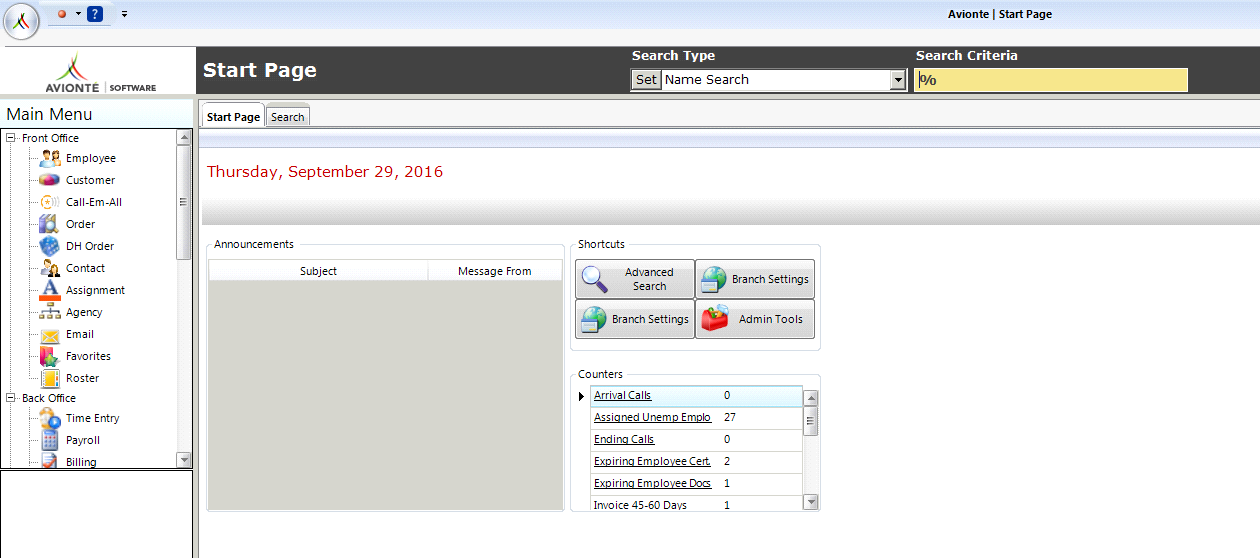
This interface has been called "core application" rather than "Avionté" since the introduction of the web portals and the Aero platform, which are also part of Avionté. Though they interface with the same data, the core app differs from the web portals and Aero in functionality, behavior, and style.
Cost Worker Comp Cost
- WC Wages × Rate Percent = Worker Comp Cost
- WC Wages × Cost Percent = Cost Worker Comp Cost
- Rate % = Changes according to customer
- Cost % = Base rate, not likely to change
Gross Profit (GP)
Profit made by a staffing company on a transaction.
- GP = Bill Amt. – (Gross Wages + WC Cost + Employer Taxes + Burden)
- PaymentCost = Gross Wages + Employer Taxes
- Gross Amount = (Bill Amt. + GP Adj. Bill) – (Gross Wages + GP Adj. Pay) + WC Cost + Employer Taxes + Burden
- = (BillAmount + GPAdjustmentBill) – (PaymentCost + GPAdjustmentPay + GPAdjustmentCost + CreditCardFee)
Pay Percent of Transaction
A paycheck can have multiple transactions. Pay Percent of Transaction refers to what percentage of the total paycheck amount each transaction occupies.
Example — Paycheck 123 with three transactions:
| Type | Pay Unit | Pay Rate | Total Pay | Pay % of Transaction | |
|---|---|---|---|---|---|
| Transaction 1 | Reg | 10 | $10.00 | $100.00 | (100 / 450) × 100 = 22.22% |
| Transaction 2 | Reg | 20 | $10.00 | $200.00 | (200 / 450) × 100 = 44.44% |
| Transaction 3 | Reg | 15 | $10.00 | $150.00 | (150 / 450) × 100 = 33.33% |
| Total Paycheck: | $450.00 | 99.99% ≈ 100% | |||
Time Entry
A broad term referring to an employee entering time for payroll purposes, or a staffing agent entering an employee's time into a payroll system and processing it through payroll.
- Time Entry Process — Creating transactions for every assignment that needs to be paid or billed for a given accounting period. Hours or units can be entered by a user or an automated process.
- Create Transaction — Pulls all transactions from open Assignments ready to be paid or billed for an open Accounting period.
- Time Entry Batch — Allows a user to group information in time entry or enter time for a specific group of employees. A New Batch Wizard opens to create the batch.
-
Transaction "units" (Sheet View or Card View)
- Sheet View — Displays all transactions ready for time entry. Unit amounts are entered in the Pay Unit and Bill Unit cells. By default, Pay Units = Bill Units.
- Card View — Displays detailed information for one employee's transaction. Accessed by double-clicking an employee's row in Sheet View or clicking Show Card View. Time can be entered in daily or weekly view.
- Time Entry Batch Verification — Verifies all information in a selected batch. A notification appears if no errors are found; otherwise, errors/warnings appear in the tab area. All errors must be fixed before closing. Specific verifications can be turned on/off via Admin Tools > Config Options > Supplier > Option Type > tbv_%.
- Time Entry Batch Report — Report showing detailed payment and billing information for verification, correction, and record purposes.
- Time Entry Batch Close — Closing a batch marks all contents as ready for payment/billing. Only one batch can be closed at a time.
Total Adjustment Bill
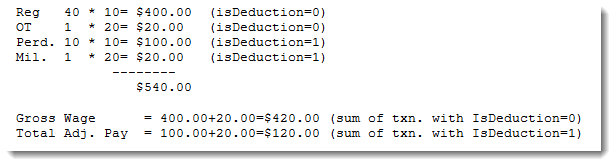
Any transaction with isDeduction=1 that doesn't add up to the Bill Amount.
Example:
- Reg 40 × 10 = $400.00 (isDeduction=0)
- OT 1 × 20 = $20.00 (isDeduction=0)
- Perd. 10 × 10 = $100.00 (isDeduction=1)
- Mil. 1 × 20 = $20.00 (isDeduction=1)
Bill Amount = $400.00 + $20.00 = $420.00
Total Adjustment Bill = $100.00 + $20.00 = $120.00
Total Bill = $420.00 + $120.00 = $540.00
Total Adjustment Pay
Any transaction with isDeduction=1 that doesn't add up to the Gross Wages.
Total Bill
The sum of Bill Unit × Bill Rate (also referred to as the sum of Item Bill).
Example: Bill Rate = $15.00, Bill Unit = $20.00 → Total Bill = $15.00 × 20 = $300.00
Total Bill = Bill Amount + Total Adjustment Bill
Total Pay
The sum of Pay Unit × Pay Rate (also referred to as the sum of Item Pay).
Example: Pay Rate = $15.00, Pay Unit = $20.00 → Total Pay = $15.00 × 20 = $300.00
Total Pay = Pay Amount + Total Adjustment Pay
Worker Comp Cost (WC Cost)
Usually: Rate × Gross Wages. When overtime or double time is involved, see the formula table below.
| Type | Pay Unit | Pay Rate | WC Code | Rate | Calc. Method | Calculation | Total |
|---|---|---|---|---|---|---|---|
| Reg | 40 | $10.00 | MN 8810 | 0.2 | Pay Unit × Pay Rate × Rate | 40 × 10 × 0.2 | $80.00 |
| OT | 2 | $20.00 | MN 8811 | 0.2 | (Pay Unit / 1.5) × Pay Rate × Rate | (2 / 1.5) × 20 × 0.2 | $5.34 |
| DT | 4 | $40.00 | MN 8812 | 0.2 | (Pay Unit / 2) × Pay Rate × Rate | (4 / 2) × 40 × 0.2 | $16.00 |
| $101.34 | |||||||
Comments
1 commentPlease sign in to leave a comment.
Great article and very helpful